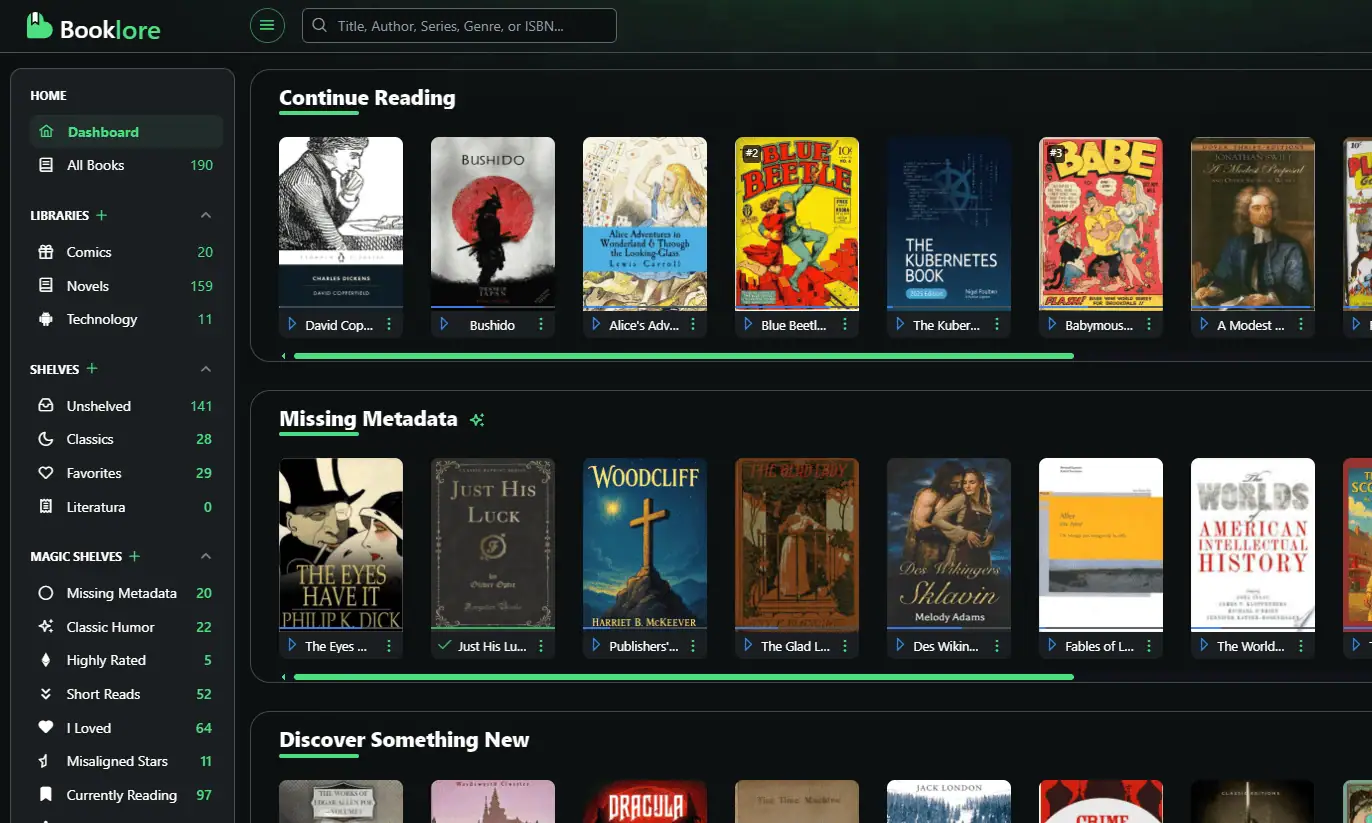
After years of accumulating ebooks scattered across devices, cloud services, and local folders, I finally decided to consolidate everything into a proper self-hosted digital library. The goal was simple: one central catalog that I could access from any device, with automatic syncing and no manual file shuffling.
Here’s how I built a personal ebook server using Booklore, cloud storage, and the OPDS protocol to keep everything synchronized across my macOS and Android devices.
The Architecture
The setup revolves around three core components:
Booklore Server runs on my Raspberry Pi 4 (pi4server), serving as the central catalog and metadata manager. The actual book files live in Wasabi cloud storage, mounted locally via rclone. This gives me the reliability of local access with the scalability of cloud storage—and Wasabi’s S3-compatible pricing is far better than constantly expanding local storage.
The catalog is exposed via OPDS v2 (Open Publication Distribution System) at https://books.yourdomain.tld/api/v2/opds/catalog. OPDS is essentially RSS for ebooks—a standardized protocol that lets reading apps discover and download books from your library without vendor lock-in.
For clients, I use Thorium Reader on macOS and PocketBook Reader on Android. Both support OPDS catalogs natively, which means they can browse my library, pull down books on demand, and stay synchronized without any manual intervention.
Adding Books to the Library
One of my favorite aspects of this setup is how friction-free it is to add new content. There are two approaches:
The direct method: Drop new .epub, .pdf, or .cbz files directly into the Wasabi bucket at ferber-storage/booklore/books. I organize these into subfolders like bookshelf, audiobooks, comics, and magazines to keep things tidy, though Booklore’s metadata does most of the heavy lifting.
The bookdrop method: For bulk additions, I use a local /mnt/ferber-storage/booklore/bookdrop folder. This is particularly useful when I’m processing multiple files—just drag them in, and Booklore’s automatic scanner picks them up during the next sync cycle.
Once books hit the storage layer, Booklore automatically indexes them, extracts metadata, and generates cover images. Within minutes, the new titles appear in the web UI and propagate to all connected OPDS clients.
Reading on macOS with Thorium
Thorium Reader is a solid open-source EPUB reader from EDRLab with excellent accessibility features and OPDS support. Setting it up is straightforward:
- Open Thorium and navigate to Catalogs → Add OPDS catalog
- Configure the connection:
- Name: Booklore
- URL:
https://books.yourdomain.tld/api/v2/opds/catalog - Credentials: Your Booklore username and password
- Browse the catalog, search for titles, and either download for offline reading or stream directly
The interface is clean and functional. Since the OPDS feed includes all the metadata and cover art Booklore generates, browsing feels native rather than like accessing a remote server.
Reading on Android with PocketBook
On Android, PocketBook Reader has been my go-to for years. It handles virtually every ebook format, has solid annotation features, and—crucially—supports OPDS catalogs.
Setup mirrors Thorium:
- Open PocketBook and tap Menu → Network → OPDS Catalogs → Add catalog
- Enter the same details:
- Name: Booklore
- URL:
https://books.yourdomain.tld/api/v2/opds/catalog - Credentials: Booklore login
- Browse and download books directly to the device
PocketBook caches covers and metadata locally, so browsing remains responsive even on slower connections. Books download quickly, and since everything routes through HTTPS via my domain, remote access works seamlessly whether I’m on home WiFi or mobile data.
The Syncing Workflow
This is where OPDS really shines. The catalog serves as a single source of truth:
- Add a book once → it appears instantly in both Thorium and PocketBook
- No manual sideloading, no file transfers, no keeping track of which device has which version
- Reading progress stays local to each app, but the library catalog itself is always in sync
The workflow becomes: drop files into Wasabi → Booklore indexes them → every connected client sees the update. It’s the kind of automation that fades into the background once it’s working.
Technical Notes and Gotchas
A few observations after running this setup for a while:
Cover generation works reliably now, but I did encounter early issues where covers wouldn’t appear. Re-indexing via Booklore’s web UI typically resolves this.
The bookdrop folder has become my preferred bulk import method—much faster than uploading individual files to Wasabi through the web interface.
HTTPS is essential for OPDS to work properly on mobile clients. I route everything through Nginx Proxy Manager with a valid certificate. If you’re running this locally, you’ll need proper SSL termination.
Path rewriting: Depending on your container setup, you might need an NPM regex rule to rewrite /covers/ paths correctly. This wasn’t necessary in my configuration, but it’s worth noting if cover images aren’t loading.
Metadata cleanup happens server-side. If a book imports with incorrect or missing metadata, fixing it in Booklore’s UI propagates the changes to all clients on the next sync.
Why This Matters
There’s something satisfying about controlling your own digital library infrastructure. No vendor can revoke access, change terms of service, or discontinue support for a format you depend on. The books are yours, stored how you want, accessible how you need.
More practically, having everything centralized means I actually read more. The friction of “which device has that book?” or “did I already download this?” disappears entirely. Browse, download, read. That’s it.
If you’re running a homelab and drowning in unorganized ebooks, Booklore with OPDS is worth exploring. It’s not the flashiest self-hosted service, but it solves a real problem elegantly—which is exactly what good infrastructure should do.
Resources
- Booklore: GitHub repository
- Thorium Reader: Official site
- PocketBook Reader: Google Play
- OPDS Specification: opds.io
Have you built a similar ebook server setup? I’d be interested to hear what readers and protocols you’re using?
| Share this post |
|
|